Introduction
Modeling is simply the art and science of creating a collection of atoms that either mimics the shape of a real-world material or expresses your imagination of abstract material.
Modes
There are two principal modes (Object and Edit) which are used for creation, editing and manipulation of atoms. In the top left corner of the 3D viewport, you can find the Mode select menu:
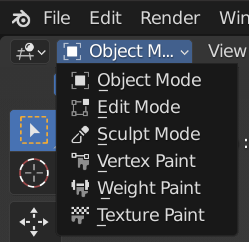
Or you can use the hotKey: Tab key for switching between edit and object modes. Switching between modes while modeling is common. Some tools may be available in more than one mode while others may be unique to a particular mode.
Object Mode
The default mode. To edit the object as whole, e.g. position, rotation, size.
Edit Mode
Edit Mode is the main mode where modeling takes place. Edit Mode is used to edit the following types of objects:
Atom
Cell
Bond
Plane
Isosurface
To edit the elements in a object. e.g. single atom, bonds. You can enable atoms indices in the Viewport Overlays panel from the 3D viewport.

You can only modify the element of the objects you are editing. To modify other objects you can leave Edit Mode, select another object and enter Edit Mode, or use Multi-Object Editing.